Other small changes: Timestamps on third-party apps and clients can now choose to display either the date or the time. And the Twitter logo is no longer required on individual tweets in third-party clients. The changes are in-and-of themselves minor, but together make up a lot of new material for developers to tackle. Source
Showing posts with label twitter. Show all posts
Showing posts with label twitter. Show all posts
Other small changes: Timestamps on third-party apps and clients can now choose to display either the date or the time. And the Twitter logo is no longer required on individual tweets in third-party clients. The changes are in-and-of themselves minor, but together make up a lot of new material for developers to tackle. Source

The IOS version also got an update as stated on Mashable:
Vine has also submitted at app update to the Apple App Store for a feature that lets you tag friends in videos, the report said.The news comes just a few weeks after the company introduced the ability to embed Vine videos (at full 600 x 600 resolution) on any website.The platform has gained popularity over recent months. It's been used by musicians and brands to promote products, news stations to get out news, job applicants and even by the White House. Of course, Vines are also acceptable for sharing with friends how you make dinner and what you're doing in your free time.

Twitter recently launched Vine. This app is an instagram style video app to make short (6 second) video's to share on twitter. For now it's only available for the iPhone but I'm pretty sure an Android and Windows Phone version will be launched in March 2013.
 There are 21 different keyboard shortcuts that you should start using to save you time and make you the world’s most efficient tweeter.
It’s easy to access these shortcuts.
There are 21 different keyboard shortcuts that you should start using to save you time and make you the world’s most efficient tweeter.
It’s easy to access these shortcuts.
To check out the key (Picture below), just visit Twitter.com and then type the question mark [?] key on your keyboard. Make sure your cursor isn’t on the Search or What’s Happening field though. Give it a spin by trying to post a new status update using just your keyboard.
Side note, the retweet key [t] will only work when you are on a profile that’s not your own.
The Guide
Below are the many keyboard shortcuts now available to all users. Just use them while browsing Twitter on your computer.

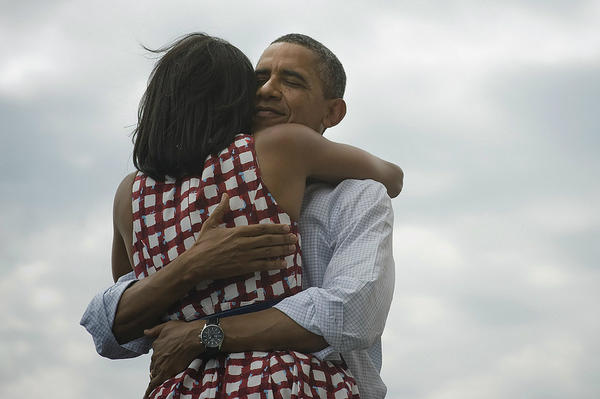
This picture tweeted by Barack Obama right after it was clear he won the 2012 elections is now the most retweeted picture EVER on twitter!
His tweet has now been retweeted over 600,000 times!
His tweet has now been retweeted over 600,000 times!


